Process orchestration
Long-running workflows with branches, human steps, and monitorable runs—ProcessFlow on your tenant.
Product
Orders, jobs, shipments, and cases cross POS, ERP, CRM, ticketing, and email. When work lives in spreadsheets and inboxes, cycle times slip and ownership disappears.
Tealfabric is a governed operations platform: connect your stack, execute with people and governed AI agents, and prove what happened—with human approval before risky steps.
The gap
Each application manages its own slice. Running the business—fulfilling orders, delivering services, moving goods, closing cases—crosses all of them.
Teams reconcile POS, ERP, CRM, and ticketing by hand when numbers or owners do not match.
Email, spreadsheets, and chat carry work that should run as a repeatable process.
Scripts and zaps run without approval, audit, or a single place to see what executed.
Platform class
Tealfabric brings together what analysts group as BOAT—Business Orchestration and Automation Technologies: process orchestration, enterprise connectivity, customer-facing surfaces, and agentic automation under governance—in one runtime.
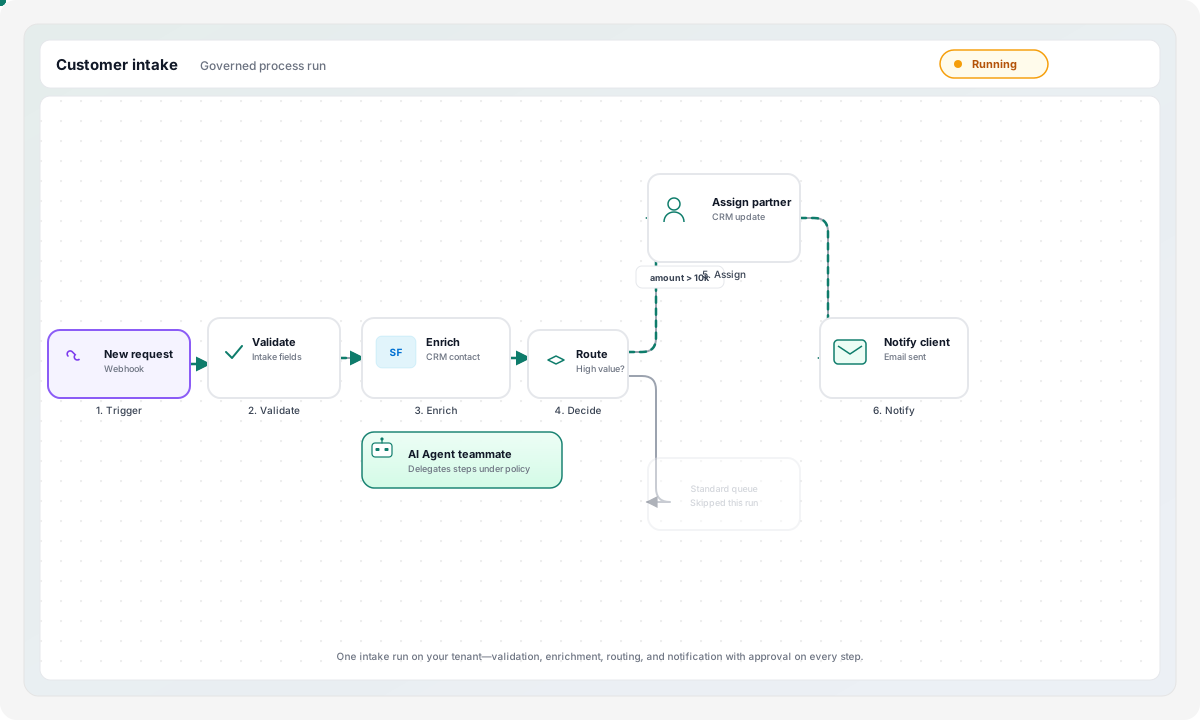
Long-running workflows with branches, human steps, and monitorable runs—ProcessFlow on your tenant.
Governed integrations called from processes and agents—not disconnected zaps.
WebApps for intake, partners, and customers—backed by the same process engine.
Agents and AI steps inside the run, with human approval before sensitive execute.
You do not need the acronym to buy: start with one production workflow—intake, an exception path, or integration recovery—then expand on the same tenant. Customer & vendor intake workflow.
What is Tealfabric?
Tealfabric is a governed operations platform that runs business processes across people, AI agents, and existing business systems.
Demo
A one-minute walkthrough of the governed runtime—workflows, integrations, and operational data on one tenant.
Tealfabric — Product demo
Architecture
Tealfabric is where handoffs between CRM, ERP, and support actually run—coordinating systems, people, and AI as work moves from sale to support, without replacing your stack.
Capabilities
Four jobs Tealfabric performs—before you need to learn product module names.
Keep every system working as one operation.
Your business already has the applications it needs.
Tealfabric connects CRM, ERP, portals, and data platforms so information moves without manual re-entry.
Information moves automatically instead of being manually re-entered.
Move work from sales to delivery without emails, spreadsheets, or status meetings.
Customer work rarely stays inside one application.
Onboarding, fulfillment, and support resolution span multiple teams—Tealfabric routes tasks, approvals, and escalations in one flow.
Work keeps moving without manual coordination.
Move faster without losing control.
Automation without governance creates risk.
Every workflow can include approvals, permissions, and a clear record of what ran:
Teams move faster without losing control.
Use AI inside operations—not beside them.
AI should assist operations, not bypass them.
Tealfabric gives AI agents controlled access to business processes. AI can:
Faster operations with accountable AI.
Example
A single workflow shows how Tealfabric keeps work moving across the systems and teams you already have.
Closed-won data triggers onboarding in Tealfabric—not a manual handoff email.
CRM is updated and a shared operational record starts with everything delivery needs.
Tasks, owners, and due dates route to the right teams without re-keying.
Provisioning and billing systems receive governed updates under your approval rules.
Delivery history and commitments are available before the first support ticket.
Status and next steps go out from one process—not three disconnected tools.
Expansion and renewal milestones stay on the same operational record.
Agents surface blocked steps and propose actions—people approve before anything executes.
Components
Product components that deliver the operational model above—on one tenant.
Workflows that span the tools your teams already use.
Build processes across teams, systems, and AI agents—from deal close through delivery and support.
One operational record across the customer journey.
Instead of duplicating information across systems, Datapools maintain the shared context every handoff needs.
Every decision and action on the record.
Track process execution, user actions, AI actions, system interactions, and approval history in one place.
Connect to existing systems without replacing them.
Tealfabric complements your stack—CRM, ERP, and ticketing stay in place while work runs between them.
Explore Integration layer →Integration recovery assistant
Controlled · Playbook: failed-sync-retry
Simulated conversation — connections run only after human approval
Governed AI in practice: alert → triage → human approval → controlled execute
Fit
Solutions
This page explains the mechanism. For business outcomes, comparison to traditional automation, and design-partner pilot metrics, see Solutions. For reference workflows by operational area, see Use cases.
Adoption
You do not need every capability on day one. Most teams begin with one production workflow—then add governed AI, portals, and operational data on the same tenant.
Not sure where you fit? Use cases · Compare approaches
For builders and operators
Developer APIs, governance, and observability—when you need depth beyond the operational model.
Walk through one operational workflow on a tenant—then map how work moves between your systems and teams.